Recovery
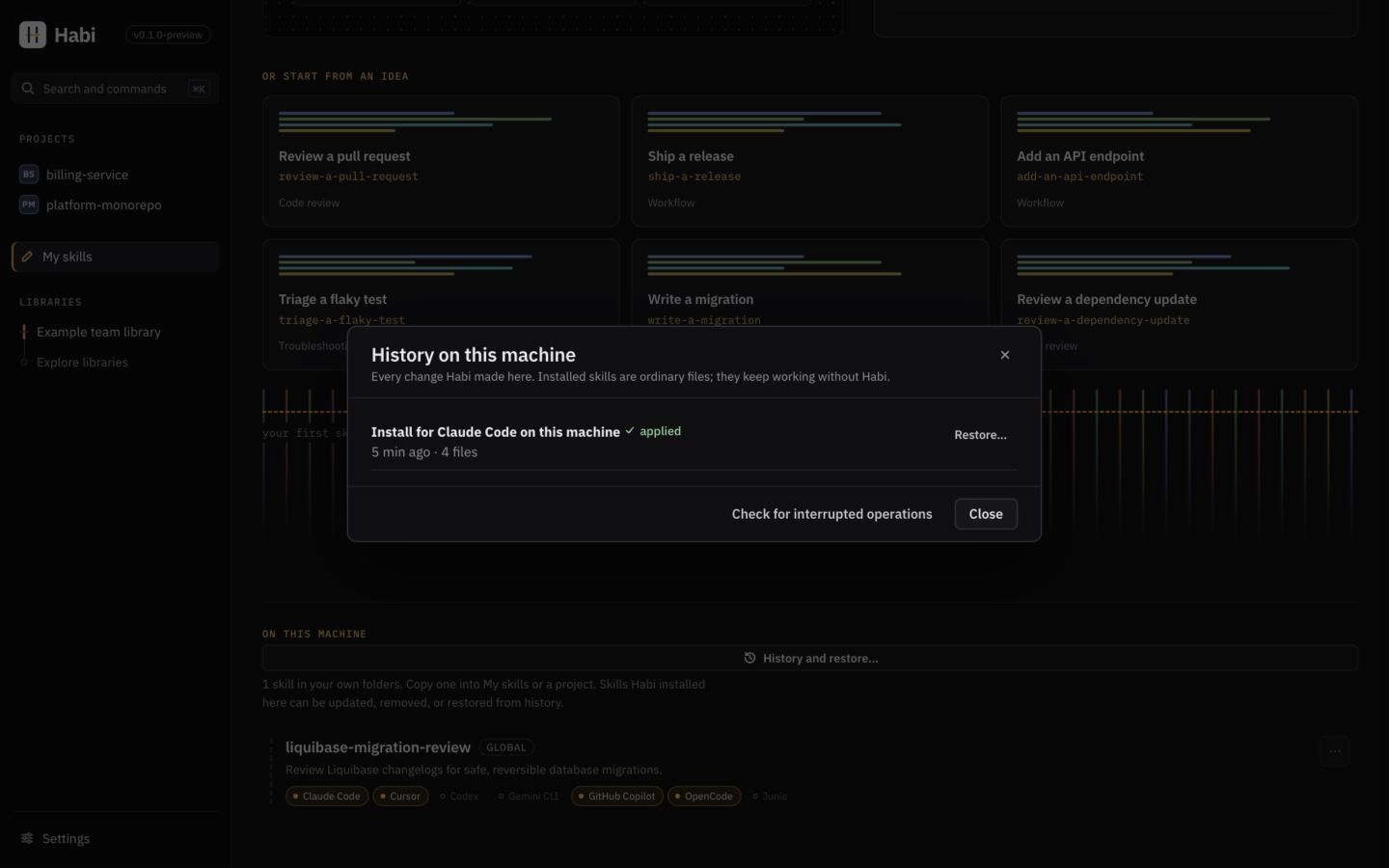
Every change to projects and personal skill folders is journaled and can be undone. Interrupted changes roll back automatically before the next operation.
Open a project's History, or My skills → On this machine → History and restore…
for personal skill installs (~/.claude/skills, ~/.agents/skills). Choose Restore… to
review the files before anything changes. History remains available after the last personal
skill is removed. Both screens offer Check for interrupted operations.
(<data> = Habi's data folder; see Settings → This machine → Data folder)
How changes are applied#
Habi uses a write-ahead journal (<data>/journal/) for safety:
- Lock the project
- Rollback any crashed operations
- Verify preconditions (if changed →
stalePlan, abort) - Backup files in blob store, journal state =
applying - Apply changes atomically
- Journal state =
committed
Failure scenarios:
| What goes wrong | What happens |
|---|---|
| Step fails (permissions, disk full) | Completed steps undone; journal → rolledBack |
| Process crashes mid-apply | Next operation undoes it, or use Check for interrupted operations |
| File changes after Habi writes it (before undo) | Left as-is, reported; journal → needsAttention |
| You restore a completed operation | Built as new plan; conflicts appear if files changed |
| Only file's executable bit changed | Restore puts the bit back (tracked in journal) |
Lock file written last → interrupted applies never record unwritten files.
Restoring & the lock file#
Restore recomputes .habi/lock.json (doesn't restore it as-is) to handle overlapping changes:
- Items unchanged by restore → keep current entries
- Items changed again later → stay current (preview shows this)
- All others → go back to pre-operation entries
- Only files actually on disk are recorded; deleted files are unlisted
Restoring a case-only rename (checklist.md → Checklist.md) renames the file back, also on
case-insensitive filesystems (macOS, Windows default), where both names are the same file.
MCP updates#
An update adopts changed server definitions and removes servers the item no longer needs. A server the item suggests only now is never added unasked: the update preview lists it under New MCP server with Add the suggested MCP configuration (off by default). Items installed without MCP configuration are not offered any.
Libraries#
| Situation | What happens |
|---|---|
| A network or sign-in failure on refresh | The last good snapshot stays; the library is marked stale with the error and its time. |
| Interrupted fetch | Git's own atomic ref updates leave the bare cache usable; the next refresh retries. |
| Corrupted cached content | Blob reads verify SHA-256; corruption is reported and a refresh restores the content. |
| Corrupted snapshot metadata | Reported with a prompt to refresh the library; other libraries are unaffected. |
| A tag moved or history was rewritten | A warning on the library; updates must still be reviewed before they are applied. |
Local database#
- Migrations run in transactions. Before migrating an existing database, Habi keeps a copy
(
habi.db.pre-v<N>.bak). A failed migration leaves the previous database unchanged. - A database written by a newer Habi is refused rather than modified. Move it aside to start fresh (projects and installed files are unaffected; connect your libraries again).
- Nothing in the database is needed for installed skills to work.
Projects#
- A moved or deleted project shows as missing; Habi does not recreate it.
- Malformed manifests mark coverage as failed with the reason; inspection continues.
- A malformed
.habi/lock.jsonblocks install/update with a clear message instead of being overwritten.
Freeing space#
Habi keeps each project's newest 20 operations, so they can be restored, and each library's newest 20 earlier snapshots, and tidies up after installs. Settings → Storage → Free up space removes anything older at once, along with stored file versions nothing refers to. Unfinished operations and ones that need attention are always kept, and a project or library another operation is using is skipped until the next run.
No destructive resets#
No recovery path in Habi asks the user to delete their data. The data folder can be removed safely at any time: installed project files are ordinary files and keep working.
My skills#
| Situation | What happens |
|---|---|
| A draft save fails (disk full, permissions) | The skill shows Couldn’t save with a retry and keeps the text on screen; the file on disk is the last successful write (writes are atomic). |
| The app closes or crashes while editing | Edits are written within a second of a pause, on ⌘S (Ctrl+S on Windows), on window blur and when leaving the editor. At most the last moment of typing is lost; the draft reopens from disk. |
| The draft's files were edited outside Habi | The next save pauses as a conflict. Choose Show the other version or Keep mine; nothing is overwritten until you do. |
SKILL.md no longer parses (hand-edited frontmatter) |
The skill says so, overwrites nothing, and offers Repair it as text. |
| A draft was moved to the trash by mistake | My skills → Trash → Restore. |
| The network is unavailable | Creating, editing, testing, importing from folders and projects, installing and exporting all work. Connecting or refreshing a Git library and sending a contribution fail with a specific error and can be retried; the draft is unaffected. |